MidiPanelYour MIDI controller doesn’t have to sleep when the DAW closes.Seu controlador MIDI não precisa descansar quando a DAW fecha.
Use your MIDI controller to run your whole Mac, not just the DAW.MidiPanel is a Mac app. With the DAW closed, every knob, fader and button handles Spotify volume, mute in Meet, screen brightness or any shortcut you want.Use o seu controlador MIDI para comandar o Mac inteiro, não só a DAW.O MidiPanel é um app de Mac. Com a DAW fechada, cada knob, fader e botão cuida do volume do Spotify, do mudo no Meet, do brilho da tela ou de qualquer atalho que você quiser.
Works with any MIDI controller.*Funciona com qualquer controlador MIDI.*
*Lights, displays and motorized faders work only on mapped models (see the list). New models are added every week, based on user requests.*Luzes, telas e faders motorizados funcionam só nos modelos já mapeados (veja a lista). Toda semana entram modelos novos, a partir dos pedidos dos usuários.
7 days, every feature, no card. On first launch, macOS asks for Accessibility and Automation permission.7 dias, todos os recursos, sem cartão. Na primeira vez, o macOS pede as permissões de Acessibilidade e Automação.macOS 12+ · Apple Silicon & Intel
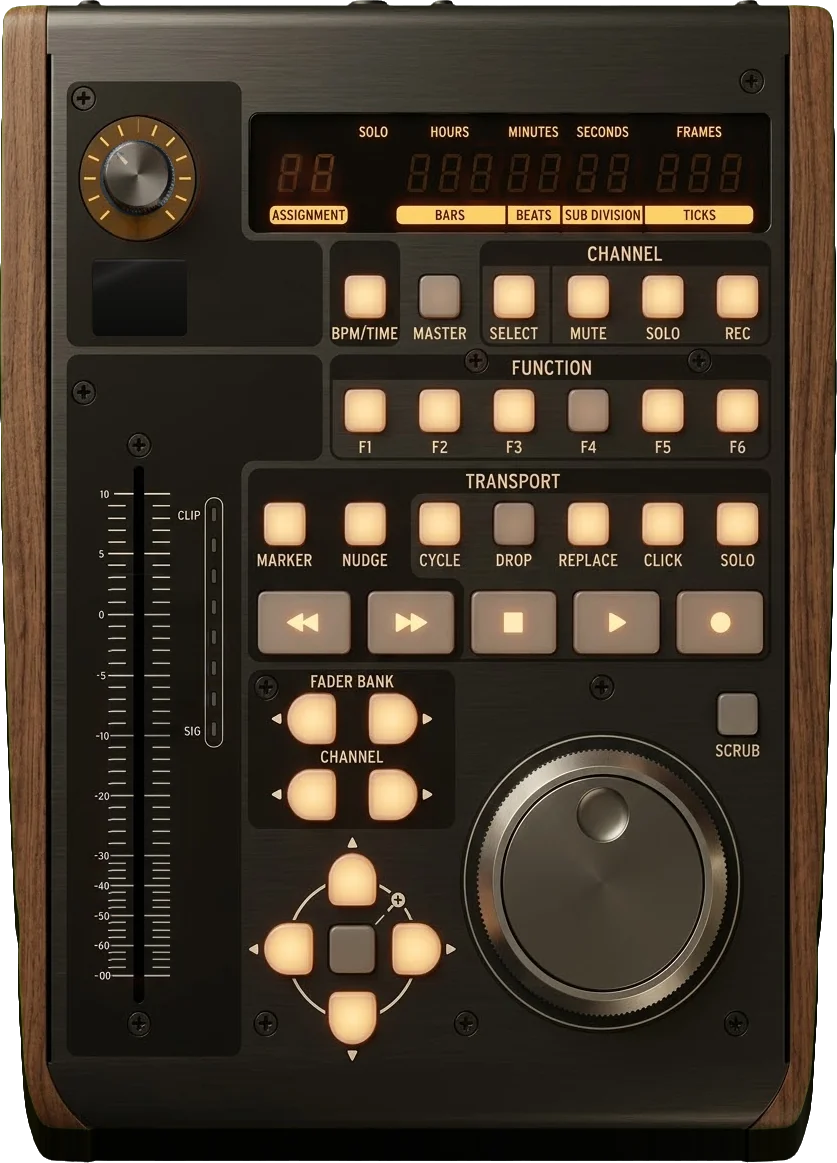
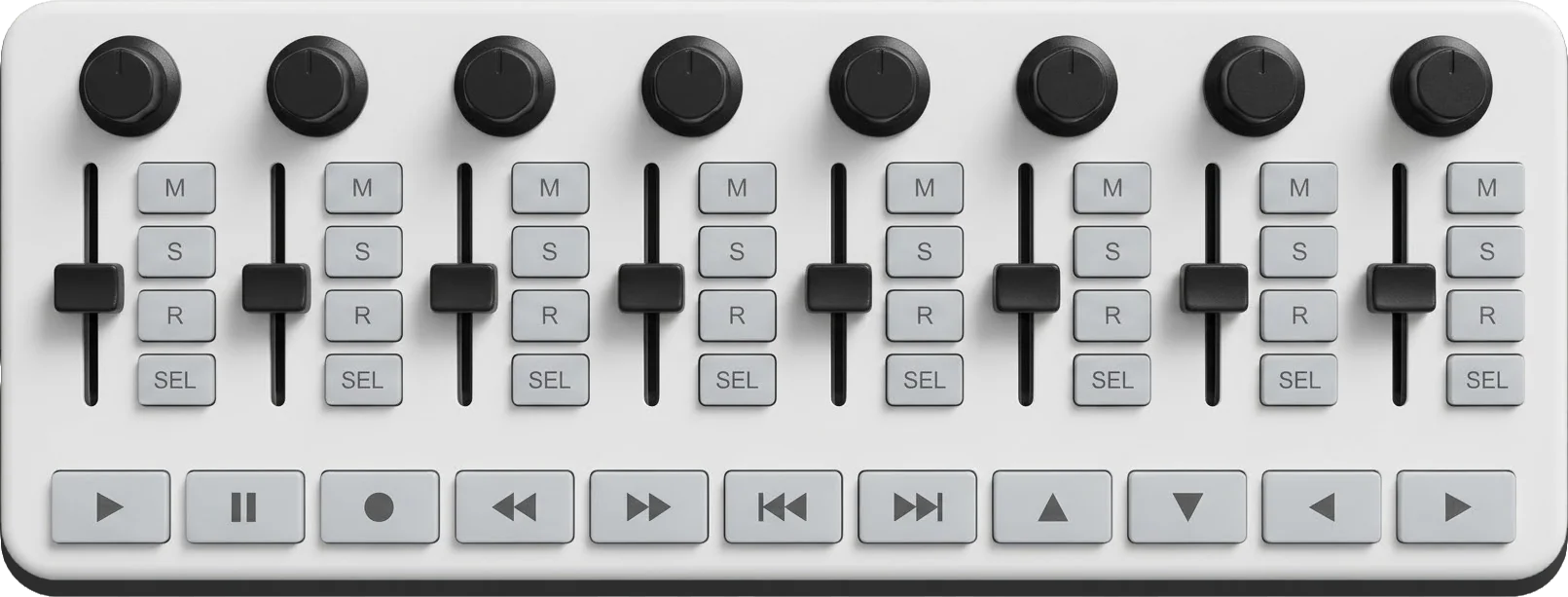
On the controllerNo controladorX-Touch One · SMC-Mixer
Motorized faderFader motorizado
62%Follows Spotify or YouTube volume in ChromeSegue o volume do Spotify ou do YouTube no Chrome
Play lightLuz do play
PLAYLit while playing, blinks on pauseAcesa tocando, pisca na pausa
Time displayDisplay de tempo
25:00
Clock, song time or a focus-timer countdownRelógio, tempo da música ou contagem do timer de foco
DisplayDisplay
LEON BRGEORGIA
The song and artist, the volume or brightness level, and what a button just didMúsica e artista, o nível do volume ou do brilho, e o que um botão acabou de fazer
Knob ringAnel do knob
70%Screen brightness, the real levelBrilho da tela, o nível real
No lights or screen? It works the same.Sem luz nem tela? Funciona igual.PlayPlayNextPróximaMuteMudoCameraCâmeraScreenshot⌘⇧4Print de tela⌘⇧4SpotifyTile windowsOrganizar janelasBright +Brilho +A pad controller like the MPK Mini or Launchkey: each pad becomes an action, each knob a volume.Um controlador de pads como o MPK Mini ou o Launchkey: cada pad vira uma ação, cada knob um volume.
Mic controlControle de microfone
MIC ONMeet · Zoom · Teams
And more: keyboard shortcuts, opening apps, Apple Shortcuts, tiling windows, a focus timer and a cleaning mode. See everything →E mais: atalhos de teclado, abrir apps, Atalhos da Apple, organizar janelas, timer de foco e modo limpeza. Ver tudo →
Plug in a mapped controller and it’s already set up.Plugue um controlador mapeado e ele já vem configurado.
Zero setupZero configuração
Plug it in and it works. The fader already controls whatever is playing, the lights come on, the display shows the song.Plugou, funciona. O fader já controla o que está tocando, as luzes acendem, o display mostra a música.
on mapped modelsnos modelos mapeados
Set it up by clicking a photo of your controllerConfigure clicando na foto do seu controlador
A real, clickable picture of it. Click the button you see and pick what it does. No table of notes, CCs and channels.Uma foto real e clicável. Clique no botão que você vê e escolha o que ele faz. Sem tabela de nota, CC e canal.
other controllers: Learn modeoutros controladores: modo Aprender
The song on the display, the fader at the real volumeA música no display, o fader no volume real
Song and artist on the display. Clock or focus timer on the time display. Play lit while music plays. The motorized fader follows the real volume. Faders without a motor use pick-up: if the Mac is at 20% and the fader sits at 0, nothing jumps. The fader takes over when it reaches 20%.Música e artista no display. Relógio ou timer de foco no display de tempo. Play aceso enquanto a música toca. O fader motorizado segue o volume real. Fader sem motor usa pick-up: se o Mac está em 20% e o fader no 0, nada pula. O fader assume quando chega em 20%.
X-Touch One · SMC-Mixer · 8 more in betaX-Touch One · SMC-Mixer · mais 8 em beta
Made for the MacFeito para o Mac
A native menu-bar app: close the window and your controller keeps working. Signed and notarized by Apple. No account, no telemetry, and your mappings stay on your Mac.Um app nativo de barra de menus: feche a janela e o controlador continua funcionando. Assinado e notarizado pela Apple. Sem conta, sem telemetria, e seus mapeamentos ficam no seu Mac.
Volume moves only when you move a controlO volume só muda quando você mexe num controle
Your DAW’s virtual MIDI never triggers actionsO MIDI virtual da sua DAW nunca dispara ações
Full feedback on mapped modelsFeedback completo nos modelos mapeados
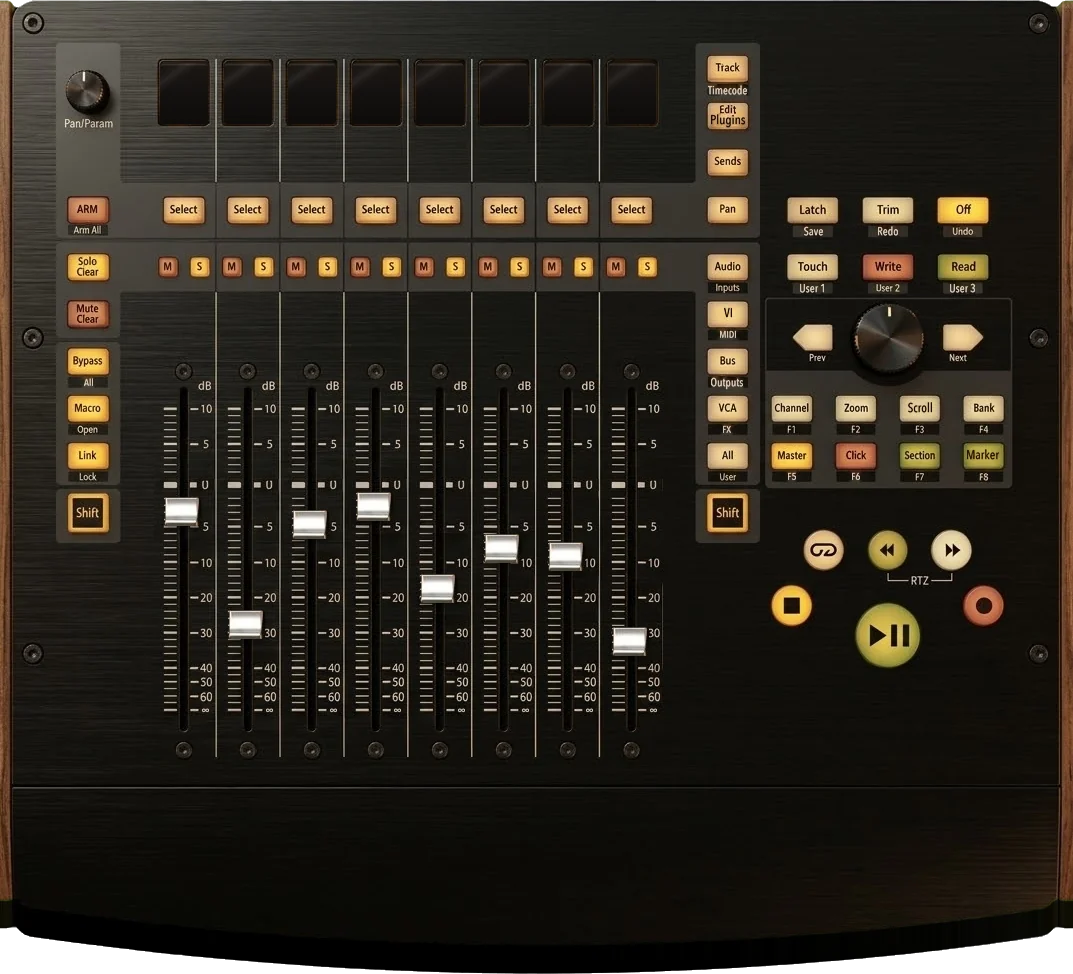
Ten models have a full layout with lights and displays: X-Touch One, SMC-Mixer, X-Touch, X-Touch Compact, X-Touch Mini, QCon Pro G2, Platform M+, FaderPort 8, FaderPort 2 and nanoKONTROL2. Every other MIDI controller works for actions and shortcuts. Details by model.Dez modelos têm desenho completo com luzes e displays: X-Touch One, SMC-Mixer, X-Touch, X-Touch Compact, X-Touch Mini, QCon Pro G2, Platform M+, FaderPort 8, FaderPort 2 e nanoKONTROL2. Qualquer outro controlador MIDI funciona para ações e atalhos. Detalhes por modelo.
MidiPanel draws your controllerO app desenha o seu controlador
Any other MIDI controllerQualquer outro controlador MIDI
USB or Bluetooth MIDI. Press a control and MidiPanel learns it. Then build your own on-screen layout: add, remove and drag controls.USB ou Bluetooth MIDI. Aperte um controle e o MidiPanel aprende. Depois monte o seu layout na tela: adicione, remova e arraste controles.
From plug to first buttonDo plugue ao primeiro botão
Plug in the controllerLigue o controladorMidiPanel finds it, even Bluetooth MIDI that connects late.O MidiPanel acha o aparelho, até Bluetooth MIDI que conecta atrasado.
Click a control on screenClique num controle na telaPick what it does. Its light blinks on the hardware until you save.Escolha o que ele faz. A luz dele pisca no aparelho até você salvar.
Press the real buttonAperte o botão de verdadeThe action happens and the controller confirms it. Close the window: it keeps working from the menu bar.A ação acontece e o controlador confirma. Feche a janela: ele segue na barra de menus.
Real hardware, app runningHardware real, app rodando
X-Touch One and SMC-Mixer, with MidiPanel running.X-Touch One e SMC-Mixer, com o MidiPanel rodando.
Pay once. Keep it.Pague uma vez. É seu.
US$19
one-time · no subscriptioncompra única · sem assinatura
launch price until Dec 31, 2026 · US$29 in 2027preço de lançamento até 31/12/2026 · US$29 em 2027
Use it on up to 3 of your MacsUse em até 3 Macs seus
Move the license to a new Mac from inside the appPasse a licença para um Mac novo pelo próprio app
Taxes included in the priceImpostos inclusos no preço
Signed and notarized by AppleAssinado e notarizado pela Apple
Try it first: 7 days free.Teste antes: 7 dias grátis.Every feature, no card, no account. Your mappings stay when you buy.Todos os recursos, sem cartão, sem conta. Seus mapeamentos continuam quando você compra.
What can each control do?O que cada controle pode fazer?
Volume and media: the volume of Spotify, Apple Music or YouTube in Chrome, even with an audio interface. System volume in about 5 ms. Play, pause, next, previous, rewind and fast-forward. A jog wheel scrubs through the song.Volume e mídia: o volume do Spotify, do Apple Music ou do YouTube no Chrome, mesmo com interface de áudio. Volume do sistema em cerca de 5 ms. Play, pausa, próxima, anterior, retroceder e avançar. A roda de jog avança e volta a música.
Meetings (Google Meet, Zoom, Microsoft Teams): mic, camera, raise hand and leave. It acts only when a call is open. Leave needs a 1-second hold.Reuniões (Google Meet, Zoom, Microsoft Teams): microfone, câmera, levantar a mão e sair. Só age com uma chamada aberta. Sair exige segurar 1 segundo.
Your Mac: any key combo, or a toggle between two. Open any app. Run any Apple Shortcut. Tile the front window: maximize, halves, quarters or center. Exact screen brightness.O seu Mac: qualquer combinação de teclas, ou alternar entre duas. Abrir qualquer app. Rodar qualquer Atalho da Apple. Organizar a janela da frente: maximizar, metades, quartos ou centralizar. Brilho exato da tela.
Focus and care: a focus timer on the time display. A cleaning mode switches the keyboard off while you wipe it, with a big countdown. The keyboard always comes back.Foco e cuidado: timer de foco no display de tempo. O modo limpeza desliga o teclado enquanto você limpa, com contagem grande na tela. O teclado sempre volta.
Does it work with my controller?Funciona com o meu controlador?
Any MIDI controller works for actions and shortcuts. Lights, displays and motorized faders work on the 10 models below. Try it free for 7 days before you buy.Qualquer controlador MIDI funciona para ações e atalhos. Luzes, displays e faders motorizados funcionam nos 10 modelos abaixo. Teste grátis por 7 dias antes de comprar.
In MidiPanel, each one shows up as its own picture, with lights, motors and displays already mapped. Two are tested on real hardware. The other eight are in beta. A lit dot means the app drives that part.No MidiPanel, cada um aparece como foto, com luzes, motores e displays já mapeados. Dois foram testados em aparelho real. Os outros oito estão em beta. Ponto aceso: o app comanda aquela parte.
Controllers with full feedbackControladores com feedback completo
Beta: the layout and messages come from the maker’s manual and the controller’s MIDI protocol, tested in an emulator. Nobody has tested them on that exact unit yet. If it doesn’t work on yours, ask for a refund: every purchase has a full refund within 14 days.Beta: o desenho e as mensagens vêm do manual do fabricante e do protocolo MIDI do controlador, testados num emulador. Ninguém testou ainda naquele aparelho. Se não funcionar no seu, peça o reembolso: toda compra tem reembolso integral em até 14 dias.
* nanoKONTROL2: the lights follow the app after you set LED mode to External in Korg’s editor. FaderPort 8 display: coming next.* nanoKONTROL2: as luzes seguem o app depois de você pôr o LED mode em External no editor da Korg. Display do FaderPort 8: vem na próxima atualização.
X-Touch Mini and X-Touch Compact: switch the controller to MC mode. In Standard mode, they don’t respond to the app.X-Touch Mini e X-Touch Compact: ponha o aparelho no modo MC. No modo Standard, eles não respondem ao app.
Can I use it with my DAW?Dá para usar junto com a minha DAW?
Yes, one at a time. When a DAW opens, MidiPanel pauses by itself and lets go of the controller. When the DAW closes, it comes back on its own. A full DAW mode, with both at the same time, is planned for version 1.1.Sim, um de cada vez. Quando uma DAW abre, o MidiPanel pausa sozinho e solta o controlador. Quando a DAW fecha, ele volta sozinho. Um modo DAW completo, com os dois ao mesmo tempo, está previsto para a versão 1.1.
Why does it ask for permissions?Por que ele pede permissões?
To press shortcuts, move windows and control other apps, macOS requires Accessibility and Automation permission. MidiPanel asks for each one only when it’s needed.Para apertar atalhos, mover janelas e controlar outros apps, o macOS exige as permissões de Acessibilidade e Automação. O MidiPanel pede cada uma só quando ela é necessária.Details in the manualDetalhes no manual.
 MidiPanel